📢input 속성
모든 태그는 속성을 가지고 있음.
<태그명 속성="값" 속성="값" 속성="값" 속성>
속성은 순서에 상관 없음.
name=" " : 서버로 정보를 전송시 변수명으로 사용되는 속성
value=" " : 서버로 전송시 값으로 사용되는 속성
name = value
id=" " : 한페이지에 하나만 허용(중복X) (주로 js에서 사용)
id가 겹치면 에러가 나지는 않지만 작동하지 않을 수 있고, 엉뚱한 작동을 할 수 있음.
class : css / js 구분자 역할을 하는 속성 중복 가능, 여러개 가능
class="a b c ab" => a b c ab 4개의 class 사용
readonly : 읽기전용
disabled : 비활성화, 서버로 값을 보내지 않음
tabindex : 탭순서 정할때 사용
required : 필수
<form action="">
    <input type="text" name="a" value="111" tabindex="5">
    <input type="text" name="b" value="222" tabindex="1">
    <input type="text" name="c" value="311" readonly tabindex="3">
    <input type="text" name="d" value="411" disabled tabindex="2">
    <input type="text" name="e" value="511" tabindex="4">
    <input type="button" disabled value="button">


    <!-- checked : checkbox, radio 버튼에서 사용하면 체크된것으로 표시 -->
    <br>
    <input type="checkbox" name="f" id="" checked> 선택1
    <input type="checkbox" name="f" id="" > 선택2

    <input type="radio" name="g" checked> 라디오1
    <input type="radio" name="g"> 라디오2

</form>
📢실습(1)
VS Code에서 extensions에서 Live Server를 다운로드 후, 다음 소스를 VS Code에서 우클릭하여 Open With Live Server를 눌러 크롬에서 띄웠다.

<!DOCTYPE html>
<html lang="en">

<head>
    <meta charset="UTF-8">
    <meta name="viewport" content="width=device-width, initial-scale=1.0">
    <title>Document</title>
</head>

<body>
    <p>
    <h1>회원가입</h1>
    </p>
    <input type="image" alt="강아지" src="../image/강아지2.jpg">
    <form action="">
        <br><br>
        아이디 : <input type="text" name="id"> <br>
        비밀번호 : <input type="password" name="password"><br>
        비밀번호 확인 : <input type="password" name="passwordCheck"><br>
        이메일 : <input type="email"><br>
        성별 :
        <label for="male">
            <input type="radio" name="gender" id="male" value="male">남성</label>
        <label for="female">
            <input type="radio" name="gender" id="female" value="female">여성</label>
        <br>
        전화번호 :
        <input type="number" name="phone1">
        <input type="number" name="phone2">
        <input type="number" name="phone3"><br>
        <input type="submit" value="회원가입">
    </form>


</body>

</html>
input에 임의의 값들을 넣은 후
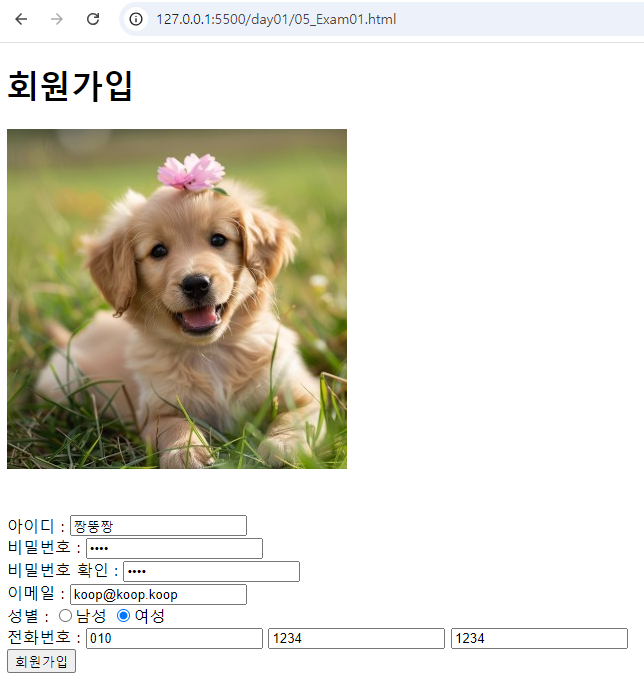
회원가입 버튼을 누르면, 쿼리스트링으로 값이 전달된 것을 확인가능
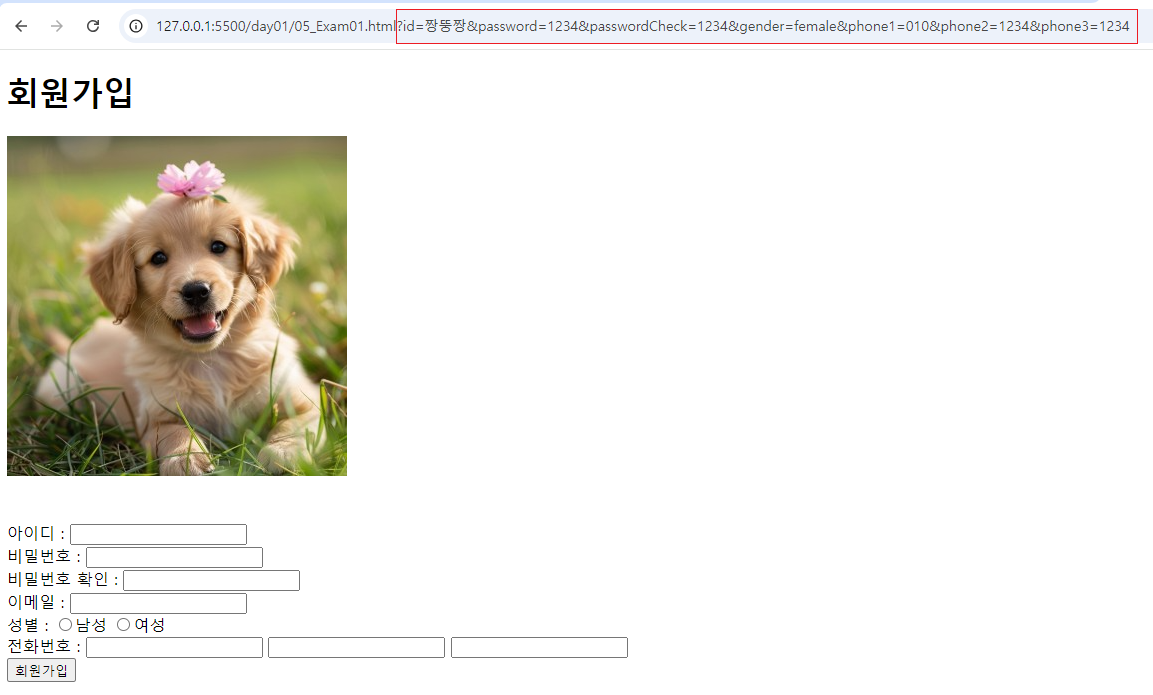
📢실습(2)
<!DOCTYPE html>
<html lang="en">
<head>
    <meta charset="UTF-8">
    <meta name="viewport" content="width=device-width, initial-scale=1.0">
    <title>Document</title>
</head>
<body>
    <p>
        <h2>공지사항</h2>
    </p>
    <hr>
    <form action="">
        <p>
        작성자
        <input type="text" name="tester" value="짱뚱짱" readonly> <br>
        제목
        <input type="text" name="title">
        <label for="ch">
            <input type="checkbox" id="ch" name="notice">공지
        </label>
        </p>
        <p>
            내용<br>
            <textarea name="content" id="" cols="50" rows="10"></textarea>
        </p>
        <hr>
        <p>
            파일첨부 <br>
            <input type="text" disabled> <input type="file" name="file1"> <br>
            <input type="text" disabled> <input type="file" name="file2"> <br>
            <input type="text" disabled> <input type="file" name="file3"> <br>
        </p>
        <p>
            <small>
                <pre>
- 파일 확장자가 zip,pdf,hwp,doc,docx,txt,xls,xlsx,ppt,pptx,jpg,jpeg,gif,png,egg,dwg,max,psd,ai인 파일만
  업로드하실 수 있습니다. (파일명은 특수문자 +,#,$ 등 & 공백 사용금지!)
- 파일 업로드 시, 첨부파일 1개당 200MB 까지 가능합니다.
                </pre>
            </small>
        </p>
        <hr>
        <input type="reset" value="취소">
        <input type="submit" value="등록">
    </form>
</body>
</html>
공지사항
'프론트엔드 > HTML' 카테고리의 다른 글
| a 태그 (0) | 2024.08.30 |
|---|---|
| select 태그 (0) | 2024.08.30 |
| textarea 태그 (0) | 2024.08.30 |
| input, form 태그(1) (0) | 2024.08.29 |
| HTML 텍스트(text) (0) | 2024.08.29 |